> For the complete documentation index, see [llms.txt](https://windows.help.formit.autodesk.com/llms.txt). Markdown versions of documentation pages are available by appending `.md` to page URLs; this page is available as [Markdown](https://windows.help.formit.autodesk.com/de/tool-library/properties.md).

# Eigenschaften

Die **Eigenschaftenpalette** zeigt Informationen und Daten an, die für ein ausgewähltes Objekt in der Formit-Arbeitsebene relevant sind.

Mit der Eigenschaftenpalette können Sie die Gruppe eines Objekts bearbeiten, einem Layer ein Objekt zuweisen und das Material eines Objekts ändern.

![](/files/iZilCBp2dhDi0oStEwUO)

## Bearbeiten über die Eigenschaftenpalette

In FormIt 2023 und höher können Sie die Eigenschaften eines Scheitelpunkts, einer Kante, einer Fläche und eines Volumens über die Eigenschaftenpalette ändern:

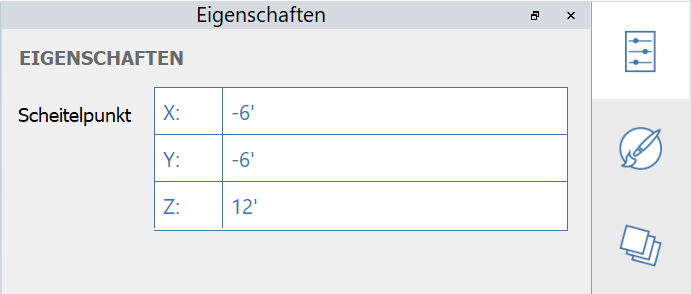
#### Bearbeitbare Scheitelpunkteigenschaften:

<figure><img src="/files/VeAP51bBVw56CQsCd353" alt=""><figcaption></figcaption></figure>

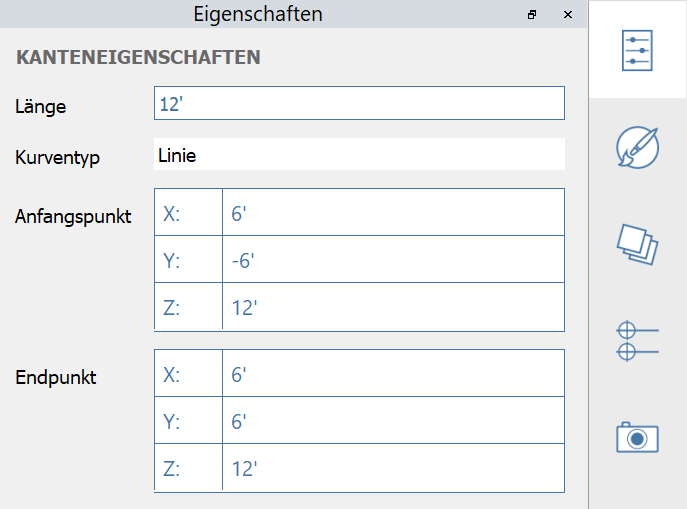
#### Bearbeitbare Kanteneigenschaften:

<figure><img src="/files/bsZFJB4JLtneUS6dCJWh" alt=""><figcaption></figcaption></figure>

#### Bearbeitbare Flächeneigenschaften:

<figure><img src="/files/RYyxVmIZtkGpcKdxKizD" alt=""><figcaption></figcaption></figure>

#### Bearbeitbare Volumeneigenschaften:
<figure><img src="/files/S8170gAFFtYcQLDuilZ6" alt=""><figcaption></figcaption></figure>


---

# Agent Instructions
This documentation is published with GitBook. GitBook is the documentation platform designed so that both humans and AI agents can read, navigate, and reason over technical content effectively. Learn more at gitbook.com.

## Querying This Documentation
If you need additional information that is not directly available in this page, you can query the documentation dynamically by asking a question.

Perform an HTTP GET request on the current page URL with the `ask` query parameter:

```
GET https://windows.help.formit.autodesk.com/de/tool-library/properties.md?ask=<question>
```

The question should be specific, self-contained, and written in natural language.
The response will contain a direct answer to the question and relevant excerpts and sources from the documentation.

Use this mechanism when the answer is not explicitly present in the current page, you need clarification or additional context, or you want to retrieve related documentation sections.