# プロパティ

**\[プロパティ]パレット**には、FormIt の作業面で選択されているオブジェクトに関する情報とデータが表示されます。

\[プロパティ]パレットを使用すると、オブジェクトのグループの編集、オブジェクトのレイヤへの割り当て、オブジェクトのマテリアルの変更を行うことができます。

![](/files/AEdly0tEgVppXcLrBZUJ)

## \[プロパティ]パレットで編集する

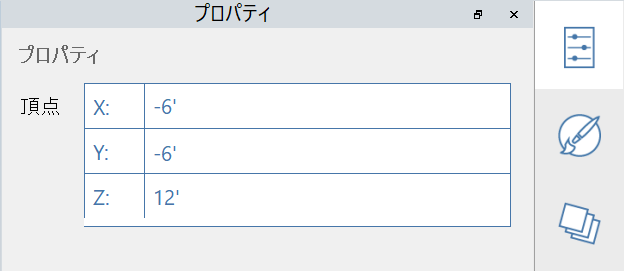
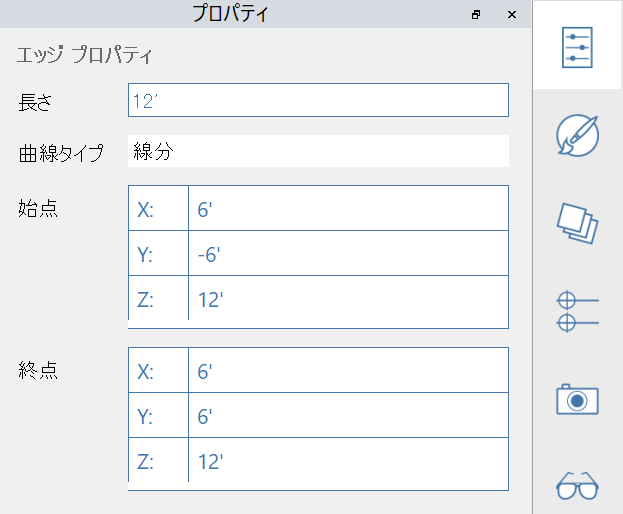
FormIt 2023 以降では、\[プロパティ]パレットを使用して、頂点、エッジ、面、および体積のプロパティを修正することができます。

#### 編集可能な頂点プロパティ:

<figure><img src="/files/nc3rQsfycotGSFwjOPgU" alt=""><figcaption></figcaption></figure>

#### 編集可能なエッジ プロパティ:

<figure><img src="/files/V1MruW00wFHkhLFAUlIT" alt=""><figcaption></figcaption></figure>

#### 編集可能な面プロパティ:

<figure><img src="/files/Umy9FpOnhSv8xHVKkHOe" alt=""><figcaption></figcaption></figure>

#### 編集可能なソリッド プロパティ:

<figure><img src="/files/cOKOpY8J1RBXQXFHGoXq" alt=""><figcaption></figcaption></figure>


---

# Agent Instructions: Querying This Documentation

If you need additional information that is not directly available in this page, you can query the documentation dynamically by asking a question.

Perform an HTTP GET request on the current page URL with the `ask` query parameter:

```
GET https://windows.help.formit.autodesk.com/ja/tool-library/properties.md?ask=<question>
```

The question should be specific, self-contained, and written in natural language.
The response will contain a direct answer to the question and relevant excerpts and sources from the documentation.

Use this mechanism when the answer is not explicitly present in the current page, you need clarification or additional context, or you want to retrieve related documentation sections.