> For the complete documentation index, see [llms.txt](https://windows.help.formit.autodesk.com/llms.txt). Markdown versions of documentation pages are available by appending `.md` to page URLs; this page is available as [Markdown](https://windows.help.formit.autodesk.com/pt-br/tool-library/place-primitive-object-1.md).
# Inserir vértice
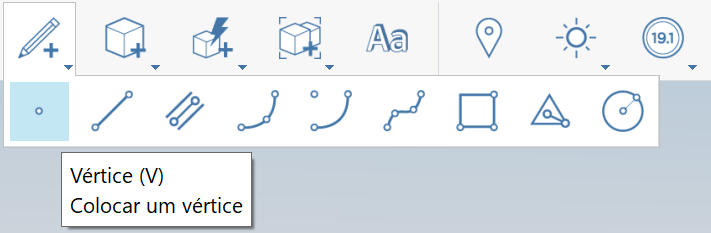
1. Na [barra de ferramentas de ação](https://github.com/FormIt3D/autodesk-formit-360-windows-help/tree/c377e7b8a3b8e43e684321d0b7de867608d317a3/tool-library/tool-bars-extended.md), clique para abrir o **botão Esboço** e [selecione](/pt-br/tool-library/select-edge-face-or-object.md) o vértice.
2. **Clique para posicionar** o vértice.
3. Observe que é possível posicionar um vértice em uma aresta para dividir a aresta. Caso contrário, o vértice permanecerá visível como um vértice independente se for posicionado em uma face ou no espaço.
1.

.png?alt=media)