> For the complete documentation index, see [llms.txt](https://windows.help.formit.autodesk.com/llms.txt). Markdown versions of documentation pages are available by appending `.md` to page URLs; this page is available as [Markdown](https://windows.help.formit.autodesk.com/zh-cn/tool-library/properties.md).

# 特性

在 Formit 工作平面中，**“特性”选项板**会显示与选定对象相关的信息和数据。

使用“特性”选项板，可以编辑对象编组、将对象指定给图层以及更改对象的材质。

![](https://3938562663-files.gitbook.io/~/files/v0/b/gitbook-x-prod.appspot.com/o/spaces%2FC2d4N7VJ5cPBb6LvhH2k%2Fuploads%2Fgit-blob-97d346a7fe0121c2332b3ae5032eabb1ae91e975%2Fproperties_palette.png?alt=media)

## 从“特性”选项板编辑

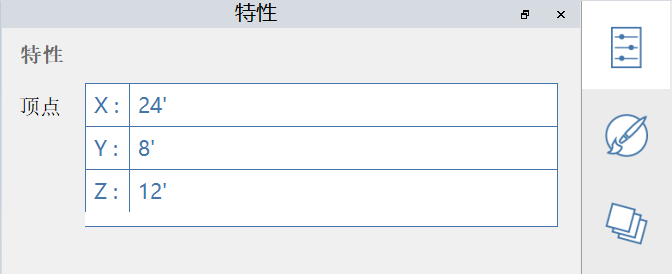
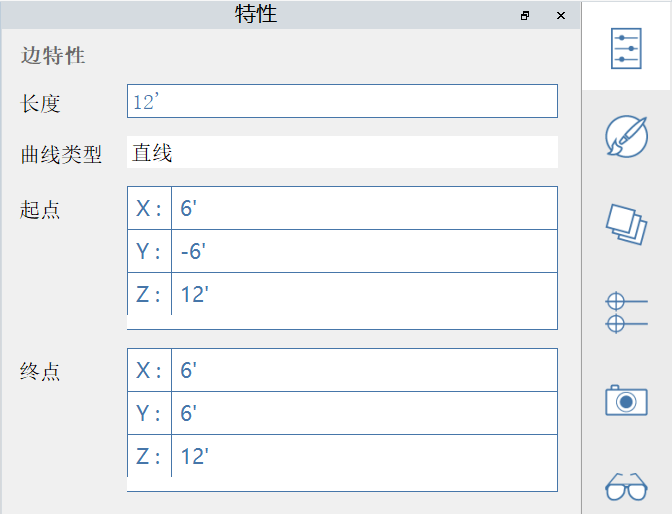
在 FormIt 2023 及更高版本中，可以通过“特性”选项板修改顶点、边、面和体积的特性：

#### 可编辑的顶点特性：

<figure><img src="https://3938562663-files.gitbook.io/~/files/v0/b/gitbook-x-prod.appspot.com/o/spaces%2FC2d4N7VJ5cPBb6LvhH2k%2Fuploads%2Fgit-blob-fa85ebf026b42d66eb2558698174760dc015fa73%2FEditVertex.png?alt=media" alt=""><figcaption></figcaption></figure>

#### 可编辑的边特性：

<figure><img src="https://3938562663-files.gitbook.io/~/files/v0/b/gitbook-x-prod.appspot.com/o/spaces%2FC2d4N7VJ5cPBb6LvhH2k%2Fuploads%2Fgit-blob-39a167d3d53367e3f7dee320b7cae3c97614a90b%2FEditEdge.png?alt=media" alt=""><figcaption></figcaption></figure>

#### 可编辑的面特性：

<figure><img src="https://3938562663-files.gitbook.io/~/files/v0/b/gitbook-x-prod.appspot.com/o/spaces%2FC2d4N7VJ5cPBb6LvhH2k%2Fuploads%2Fgit-blob-f4193d738548af7c698d913c5100b948cde4d793%2FEditFace%20(1).png?alt=media" alt=""><figcaption></figcaption></figure>

#### 可编辑的实体特性：

<figure><img src="https://3938562663-files.gitbook.io/~/files/v0/b/gitbook-x-prod.appspot.com/o/spaces%2FC2d4N7VJ5cPBb6LvhH2k%2Fuploads%2Fgit-blob-8384773a18e4f75544f863c7bc1f6cd83636911a%2Fimage%20(13).png?alt=media" alt=""><figcaption></figcaption></figure>