# 测量角度

“测量角度”工具位于[“工具栏”](/zh-cn/formit-introduction/tool-bars.md)上。

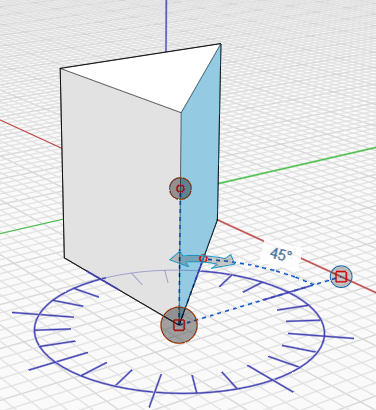
“测量角度”工具用于测量顶点、边、面和体积之间的角度。还可以使用“测量角度”工具来驱动几何图形的标注。

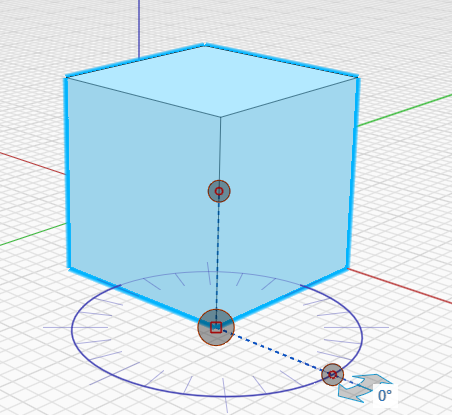
* 在 **“测量”** 工具栏菜单中，选择 **“测量角度”** 工具，或者使用键盘快捷键 **“M A”** 并选择起点。

  <img src="/files/Daa3jxuG8BagsfJXni55" alt="" data-size="original">
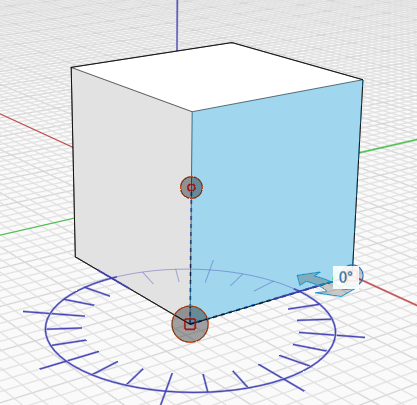
* 单击控制柄并将其拖动到起始顶点。

  <img src="/files/QrKswHa9K5vLS671VF1g" alt="" data-size="original">
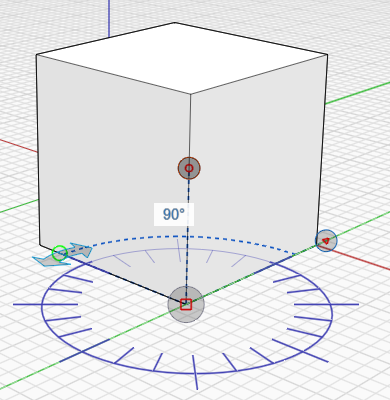
* 使用箭头测量一个点与另一个点之间的角度。

  <img src="/files/pjeQUq2i5GXbJ0EPf9pf" alt="" data-size="original">
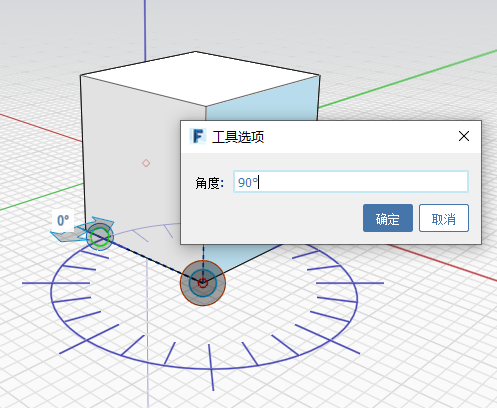
* 要更改几何图形，请单击边或面，然后通过单击显示的角度来输入新的角度值。

  <img src="/files/nuAqdX3Cuejm9R603Tow" alt="" data-size="original">
* 所做的更改或测量即会显示：

  <img src="/files/cAi3rHk7qj7moqxzYuTj" alt="" data-size="original">


---

# Agent Instructions: Querying This Documentation

If you need additional information that is not directly available in this page, you can query the documentation dynamically by asking a question.

Perform an HTTP GET request on the current page URL with the `ask` query parameter:

```
GET https://windows.help.formit.autodesk.com/zh-cn/tool-library/measure-angle-tool.md?ask=<question>
```

The question should be specific, self-contained, and written in natural language.
The response will contain a direct answer to the question and relevant excerpts and sources from the documentation.

Use this mechanism when the answer is not explicitly present in the current page, you need clarification or additional context, or you want to retrieve related documentation sections.